Mein neuer Steuerberater schickt mir passwortgeschützte Dokumente - Datenschutzgründen.
An sich nicht zu bemeckern. Ich habe auch das Passwort und kann das Dokument öffnen.
Dieses Dokument will ich nun in Paperless speichern. Leider kriege ich das Passwort nicht weg.
Klar, dass Drag&Drop nicht funktioniert. Aber auch Öffnen und dan im Consume-Ordner speichern entfernt das Passwort leider nicht.
Ideen? Ausser den Steuerberater zu überzeugen.
Das Dokument öffnen und dann als PDF in den Consume-Ordner drucken sollte funktionieren.
Okay,dazu brauche ich einen PDF-Drucker? Ginge auc exporieren?
Ja klar die einfachste Möglichkeit wäre mit dem Steuerberater zu reden. Du könntest dir aber auch Stirling-PDF auf dein NAS als Docker installieren. Dort hast du mehrere Möglichkeiten eine PDF zu bearbeiten. Auch bietet dir Stirling-PDF die Möglichkeit das Passwort zu entfernen.
Maxi
10. Juni 2026 um 11:21
5
PDF24 ist kostenfrei und stellt einen PDF-Drucker bereit.
In Version 3.0 wird es hier vsl. weitere Funktionen innerhalb paperless-ngx geben. In Github sind einmal eine “Passwort entfernen”-Funktion + passende Workflow-Erweiterungen beschrieben:
dev ← feature-pw-removal-action
offen 02:19AM - 27 Dec 25 UTC
## Proposed change
<img width="1701" height="1208" alt="Screenshot 20… 25-12-27 at 4 24 29 PM" src="https://github.com/user-attachments/assets/a7f0f8ca-07dc-4607-8981-deb003dc77ae" />
<img width="1701" height="1208" alt="Screenshot 2025-12-27 at 4 24 26 PM" src="https://github.com/user-attachments/assets/3dd561c6-b8e1-4133-89ae-b4dd0fe5a7e3" />
<img width="1701" height="1208" alt="Screenshot 2025-12-27 at 4 24 23 PM" src="https://github.com/user-attachments/assets/5d9ac614-f179-4e4e-9485-809c35c2cc6a" />
Closes #4026 (with #11665 )
Closes #1141
## Type of change
- [ ] Bug fix: non-breaking change which fixes an issue.
- [ ] New feature / Enhancement: non-breaking change which adds functionality. _Please read the important note above._
- [ ] Breaking change: fix or feature that would cause existing functionality to not work as expected.
- [ ] Documentation only.
- [ ] Other. Please explain:
## Checklist:
- [ ] I have read & agree with the [contributing guidelines](https://github.com/paperless-ngx/paperless-ngx/blob/main/CONTRIBUTING.md).
- [ ] If applicable, I have included testing coverage for new code in this PR, for [backend](https://docs.paperless-ngx.com/development/#testing) and / or [front-end](https://docs.paperless-ngx.com/development/#testing-and-code-style) changes.
- [ ] If applicable, I have tested my code for breaking changes & regressions on both mobile & desktop devices, using the latest version of major browsers.
- [ ] If applicable, I have checked that all tests pass, see [documentation](https://docs.paperless-ngx.com/development/#back-end-development).
- [ ] I have run all `pre-commit` hooks, see [documentation](https://docs.paperless-ngx.com/development/#code-formatting-with-pre-commit-hooks).
- [ ] I have made corresponding changes to the documentation as needed.
- [ ] In the description of the PR above I have disclosed the use of AI tools in the coding of this PR.
dev ← feature-pw-removal-workflow-action
offen 04:13AM - 29 Dec 25 UTC
## Proposed change
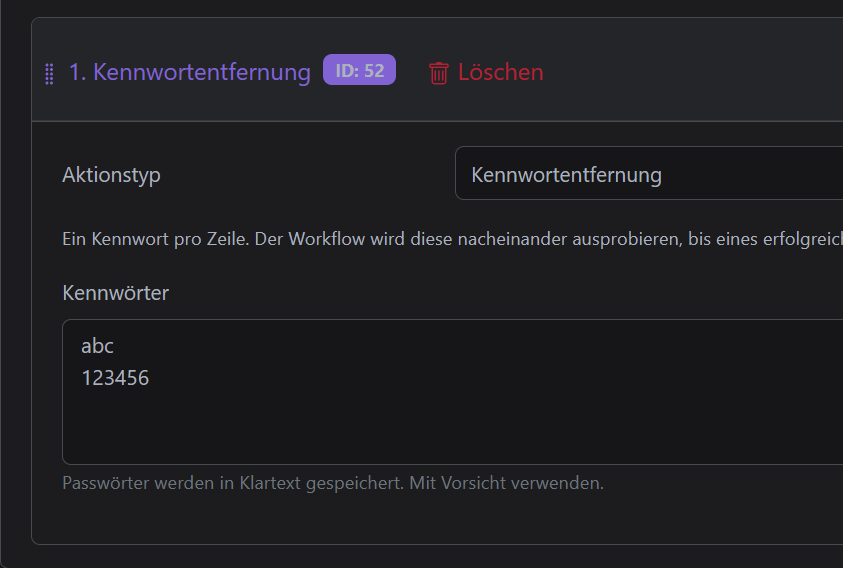
Goes along with #11656, I think this is the more robust wa… y to solve the FR, a workflow action (that can of course be used with mail imports). Separating the PRs just to make things a bit easier, but this uses the same removal function.
Edit: initially I had this skip for `ConsumableDocument`s (e.g. consumption workflow triggers) but I realized we can still attempt removal by storing the passwords and trying later, happy with that solution.
<img width="2043" height="1208" alt="Screenshot 2025-12-30 at 12 50 33 PM" src="https://github.com/user-attachments/assets/a7716dad-bf5e-4037-b1a6-8f1d177bc4aa" />
Closes https://github.com/paperless-ngx/paperless-ngx/discussions/4026 (along with #11656)
## Type of change
- [ ] Bug fix: non-breaking change which fixes an issue.
- [x] New feature / Enhancement: non-breaking change which adds functionality. _Please read the important note above._
- [ ] Breaking change: fix or feature that would cause existing functionality to not work as expected.
- [ ] Documentation only.
- [ ] Other. Please explain:
## Checklist:
- [ ] I have read & agree with the [contributing guidelines](https://github.com/paperless-ngx/paperless-ngx/blob/main/CONTRIBUTING.md).
- [ ] If applicable, I have included testing coverage for new code in this PR, for [backend](https://docs.paperless-ngx.com/development/#testing) and / or [front-end](https://docs.paperless-ngx.com/development/#testing-and-code-style) changes.
- [ ] If applicable, I have tested my code for breaking changes & regressions on both mobile & desktop devices, using the latest version of major browsers.
- [ ] If applicable, I have checked that all tests pass, see [documentation](https://docs.paperless-ngx.com/development/#back-end-development).
- [ ] I have run all `pre-commit` hooks, see [documentation](https://docs.paperless-ngx.com/development/#code-formatting-with-pre-commit-hooks).
- [ ] I have made corresponding changes to the documentation as needed.
- [ ] In the description of the PR above I have disclosed the use of AI tools in the coding of this PR.
Viele Grüße
Max
Ja ab der Version 3 kann das Passwort automatisch über ein Workflow entfernt werden. Die Passwörter müssen aber im Workflow hinterlegt sein.
Es werden aber 3 Dateien abgelegt 2 Dateien in originals (1 mit Passwort und 1 ohne Passwort) und 1 in archive.
Maxi
10. Juni 2026 um 14:52
7
Beim Steuerberater wird man wahrscheinlich ein Passwort vereinbaren. Für jede Datei ein neues Passwort vergeben zu müssen, wäre sonst schon eine kleine Farce
Ich musste mich bislang (zum Glück) noch nicht mit dieser Thematik auseinandersetzen, finde die Erweiterung jedoch sehr interessant. Besonders die Möglichkeit, den Prozess direkt über einen Workflow abzubilden, macht die Lösung für mich rund und praxisnah. Ich freue mich bereits auf Version 3
klingt gut.
Mal sehen ob ich den Workaround verhandeln kann.
Danke erstmal.