Hallo,
ich betreibe paperless-ngx in der bare-metal Variante auf einem Proxmox.
Am vergangenen Wochenende habe ich meine Installation auf 2.20.6 upgedatet.
Dabei habe ich das Update über die “Proxmox Helper Scripte” ausgeführt:
bash -c "$(wget -qLO - https://github.com/tteck/Proxmox/raw/main/ct/paperless-ngx.sh)"
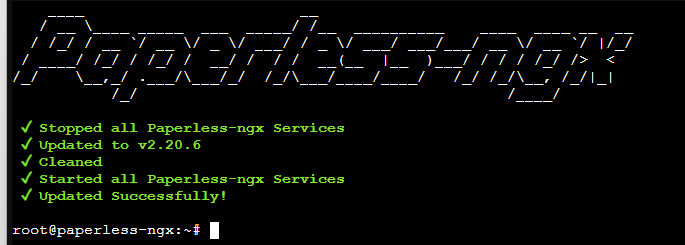
Das Update hat tadellos geklappt:
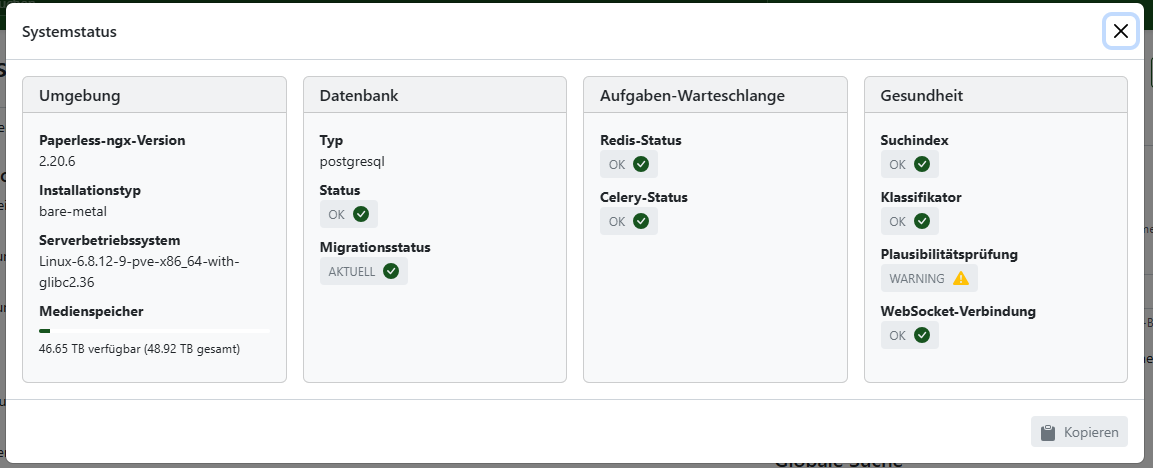
Zugriff etc funktioniert tadellos - Systemstatus ist auch OK:
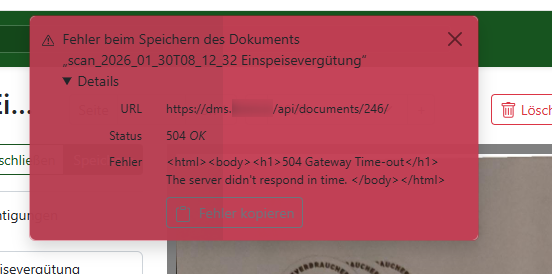
Leider kann ich bestehende Dokumente nicht editieren und auch keine neuen uploaden.
In der Web-App erhalte ich dazu folgende Meldung:
Im Log finde ich zu dem Vorgang folgende Einträge
[2026-02-06 08:40:03,460] [ERROR] [paperless.handlers] Updating PaperlessTask failed

Traceback (most recent call last):

  File "/usr/local/lib/python3.11/dist-packages/celery/app/trace.py", line 453, in trace_task

    R = retval = fun(*args, **kwargs)

                 ^^^^^^^^^^^^^^^^^^^^

  File "/usr/local/lib/python3.11/dist-packages/celery/app/trace.py", line 736, in __protected_call__

    return self.run(*args, **kwargs)

           ^^^^^^^^^^^^^^^^^^^^^^^^^

  File "/opt/paperless/src/documents/tasks.py", line 183, in consume_file

    msg = plugin.run()

          ^^^^^^^^^^^^

  File "/opt/paperless/src/documents/consumer.py", line 495, in run

    with FileLock(settings.MEDIA_LOCK):

  File "/usr/local/lib/python3.11/dist-packages/filelock/_api.py", line 376, in __enter__

    self.acquire()

  File "/usr/local/lib/python3.11/dist-packages/filelock/_api.py", line 344, in acquire

    time.sleep(poll_interval)

  File "/usr/local/lib/python3.11/dist-packages/billiard/common.py", line 106, in _shutdown_cleanup

    sys.exit(-(256 - signum))

  File "/usr/local/lib/python3.11/dist-packages/billiard/pool.py", line 283, in exit

    return _exit(status)

           ^^^^^^^^^^^^^

SystemExit: -241


During handling of the above exception, another exception occurred:


Traceback (most recent call last):

  File "/usr/local/lib/python3.11/dist-packages/django/db/backends/utils.py", line 105, in _execute

    return self.cursor.execute(sql, params)

           ^^^^^^^^^^^^^^^^^^^^^^^^^^^^^^^^

  File "/usr/local/lib/python3.11/dist-packages/psycopg/cursor.py", line 97, in execute

    raise ex.with_traceback(None)

psycopg.errors.NotNullViolation: null value in column "status" of relation "documents_paperlesstask" violates not-null constraint

DETAIL:  Failing row contains (384, 8192bbec-1cde-4346-ab1b-64106de8ec75, f, 2026-02-06 08:10:03.375409+00, 2026-02-06 08:40:03.459481+00, 2026-02-06 08:10:03.423318+00, null, null, consume_file, Scan vom 06.02.2026 0910.pdf, 4, auto_task).


The above exception was the direct cause of the following exception:


Traceback (most recent call last):

  File "/opt/paperless/src/documents/signals/handlers.py", line 918, in task_postrun_handler

    task_instance.save()

  File "/usr/local/lib/python3.11/dist-packages/django/db/models/base.py", line 902, in save

    self.save_base(

  File "/usr/local/lib/python3.11/dist-packages/django/db/models/base.py", line 1008, in save_base

    updated = self._save_table(

              ^^^^^^^^^^^^^^^^^

  File "/usr/local/lib/python3.11/dist-packages/django/db/models/base.py", line 1138, in _save_table

    updated = self._do_update(

              ^^^^^^^^^^^^^^^^

  File "/usr/local/lib/python3.11/dist-packages/django/db/models/base.py", line 1203, in _do_update

    return filtered._update(values) > 0

           ^^^^^^^^^^^^^^^^^^^^^^^^

  File "/usr/local/lib/python3.11/dist-packages/django/db/models/query.py", line 1286, in _update

    return query.get_compiler(self.db).execute_sql(ROW_COUNT)

           ^^^^^^^^^^^^^^^^^^^^^^^^^^^^^^^^^^^^^^^^^^^^^^^^^^

  File "/usr/local/lib/python3.11/dist-packages/django/db/models/sql/compiler.py", line 2060, in execute_sql

    row_count = super().execute_sql(result_type)

                ^^^^^^^^^^^^^^^^^^^^^^^^^^^^^^^^

  File "/usr/local/lib/python3.11/dist-packages/django/db/models/sql/compiler.py", line 1623, in execute_sql

    cursor.execute(sql, params)

  File "/usr/local/lib/python3.11/dist-packages/django/db/backends/utils.py", line 79, in execute

    return self._execute_with_wrappers(

           ^^^^^^^^^^^^^^^^^^^^^^^^^^^^

  File "/usr/local/lib/python3.11/dist-packages/django/db/backends/utils.py", line 92, in _execute_with_wrappers

    return executor(sql, params, many, context)

           ^^^^^^^^^^^^^^^^^^^^^^^^^^^^^^^^^^^^

  File "/usr/local/lib/python3.11/dist-packages/django/db/backends/utils.py", line 100, in _execute

    with self.db.wrap_database_errors:

  File "/usr/local/lib/python3.11/dist-packages/django/db/utils.py", line 91, in __exit__

    raise dj_exc_value.with_traceback(traceback) from exc_value

  File "/usr/local/lib/python3.11/dist-packages/django/db/backends/utils.py", line 105, in _execute

    return self.cursor.execute(sql, params)

           ^^^^^^^^^^^^^^^^^^^^^^^^^^^^^^^^

  File "/usr/local/lib/python3.11/dist-packages/psycopg/cursor.py", line 97, in execute

    raise ex.with_traceback(None)

django.db.utils.IntegrityError: null value in column "status" of relation "documents_paperlesstask" violates not-null constraint

DETAIL:  Failing row contains (384, 8192bbec-1cde-4346-ab1b-64106de8ec75, f, 2026-02-06 08:10:03.375409+00, 2026-02-06 08:40:03.459481+00, 2026-02-06 08:10:03.423318+00, null, null, consume_file, Scan vom 06.02.2026 0910.pdf, 4, auto_task).
Wenn ich das richtig interpretiere, ist die DB erreichbar - aber in der Verarbeitung gibt es Fehler.
Hier im Forum habe ich einen ähnlichen Fall - allerdings auf Docker
Auf reddit habe ich
/r/Paperlessngx/comments/1afebw6/constraint_violation_in_db_while_consuming/
gefunden (als Neuuser darf ich nur 2 Links im ersten Post einbinden).
wird ein zusätzlicher Parameter eingeführt: PAPERLESS_OCR_USER_ARGS: '{"continue_on_soft_render_error": true}'
In meiner paperless.conf ist dieser Parameter auskommentiert und ohne weitere Argumente definiert:
PAPERLESS_OCR_USER_ARGS: '{"continue_on_soft_render_error": true}'
Wie komme ich der Ursache für mein Update/Upload Fehler weiter auf die Spur?
Danke für eure Unterstützung!
Alex
—
EDIT:
Problem ist gelöst:
Die Paperless Ordner verweisen bei mir nicht auf Ordner im Container, sondern auf MountPoints.
PAPERLESS_CONSUMPTION_DIR=/mnt/dms/consume
PAPERLESS_DATA_DIR=/mnt/dms/data
Da war der Wurm drin.
Jetzt kann ich neue Dokumente wieder hochladen.